
はじめに
前回の記事の続きです。
メーター読み取りを実装する前に、画像処理のパラメータを動的に調整できるようにしておこうと思います。
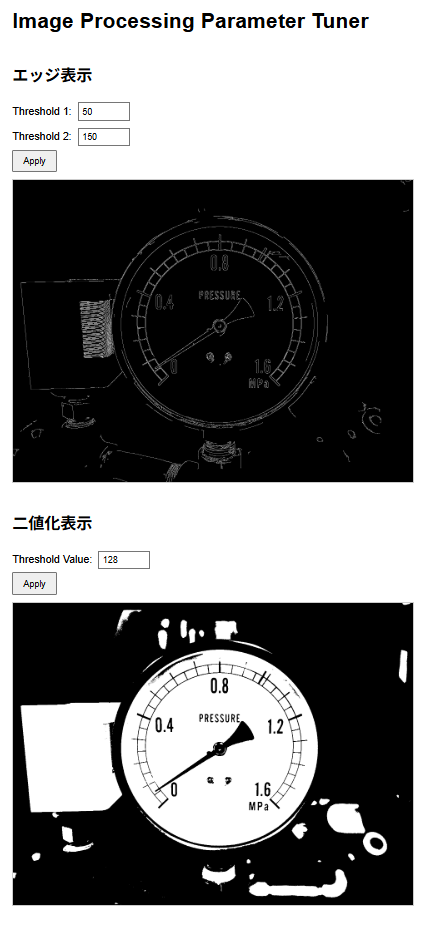
cpp-httplib を使えば、HTTPサーバーをローカルで起動して、ブラウザやcurlからパラメータをクエリパラメータで指定し、画像処理結果をリアルタイムで確認できます。
プロジェクト構成
my_opencv_project/
├── Makefile
├── include/
│   └── httplib.h
├── images/
│   └── meter.jpg
└── src/
└── main.cppcpp-httplibのインストール
cpp-httplibはヘッダーオンリーライブラリです。以下のコマンドでGitHubからダウンロードして include/ ディレクトリに配置します。
mkdir include
curl -Lo include/httplib.h https://raw.githubusercontent.com/yhirose/cpp-httplib/refs/heads/master/httplib.hmain.cpp の作成
#include "../include/httplib.h"
#include <opencv2/opencv.hpp>
#include <iostream>
#include <sstream>

int main()
{
    httplib::Server svr;

    // Cannyエッジ検出エンドポイント
    svr.Get("/api/edge", [](const httplib::Request& req, httplib::Response& res) {
        cv::Mat img = cv::imread("images/meter.jpg");
        if (img.empty()) {
            res.set_content("Image not found", "text/plain");
            return;
        }

        // クエリパラメータから閾値を取得
        int threshold1 = 50;  // デフォルト値
        int threshold2 = 150; // デフォルト値

        if (req.has_param("th1")) {
            threshold1 = std::stoi(req.get_param_value("th1"));
        }
        if (req.has_param("th2")) {
            threshold2 = std::stoi(req.get_param_value("th2"));
        }

        // グレースケール変換
        cv::Mat gray;
        cv::cvtColor(img, gray, cv::COLOR_BGR2GRAY);

        // Cannyエッジ検出
        cv::Mat edges;
        cv::Canny(gray, edges, threshold1, threshold2);

        // PNG形式で出力
        std::vector<uchar> buf;
        cv::imencode(".png", edges, buf);

        std::string body(buf.begin(), buf.end());
        res.set_content(body, "image/png");
    });

    // 2値化エンドポイント
    svr.Get("/api/threshold", [](const httplib::Request& req, httplib::Response& res) {
        cv::Mat img = cv::imread("images/meter.jpg");
        if (img.empty()) {
            res.set_content("Image not found", "text/plain");
            return;
        }

        // クエリパラメータから閾値を取得
        int threshold_val = 128; // デフォルト値

        if (req.has_param("val")) {
            threshold_val = std::stoi(req.get_param_value("val"));
        }

        // グレースケール変換
        cv::Mat gray;
        cv::cvtColor(img, gray, cv::COLOR_BGR2GRAY);

        // 2値化
        cv::Mat binary;
        cv::threshold(gray, binary, threshold_val, 255, cv::THRESH_BINARY);

        // PNG形式で出力
        std::vector<uchar> buf;
        cv::imencode(".png", binary, buf);

        std::string body(buf.begin(), buf.end());
        res.set_content(body, "image/png");
    });

    // HTML UI
    svr.Get("/", [](const httplib::Request&, httplib::Response& res) {
        std::string html = R"html(
<!DOCTYPE html>
<html>
<head>
    <title>Image Processing Parameter Tuner</title>
    <style>
        body { font-family: Arial; margin: 20px; }
        .control {
            margin: 20px 0;
            display: flex;
            flex-direction: column;
            align-items: flex-start;
        }
        .control-inputs {
            margin-bottom: 15px;
        }
        input { margin: 5px; padding: 5px; }
        button { padding: 8px 15px; cursor: pointer; }
        img { max-width: 600px; border: 1px solid #ccc; margin-top: 10px; }
    </style>
    <meta charset="UTF-8">
</head>
<body>
    <h1>Image Processing Parameter Tuner</h1>

    <div class="control">
        <h2>エッジ表示</h2>
        <label>Threshold 1: <input type="number" id="th1" value="50" min="0" max="255"></label>
        <label>Threshold 2: <input type="number" id="th2" value="150" min="0" max="255"></label>
        <button onclick="updateEdge()">Apply</button>
        <img id="edgeImg" src="/api/edge?th1=50&th2=150" alt="Edge Detection">
    </div>

    <div class="control">
        <h2>二値化表示</h2>
        <label>Threshold Value: <input type="number" id="val" value="128" min="0" max="255"></label>
        <button onclick="updateThreshold()">Apply</button>
        <img id="threshImg" src="/api/threshold?val=128" alt="Binary Threshold">
    </div>

    <script>
        function updateEdge() {
            const th1 = document.getElementById("th1").value;
            const th2 = document.getElementById("th2").value;
            document.getElementById("edgeImg").src = "/api/edge?th1=" + th1 + "&th2=" + th2 + "&t=" + Date.now();
        }

        function updateThreshold() {
            const val = document.getElementById("val").value;
            document.getElementById("threshImg").src = "/api/threshold?val=" + val + "&t=" + Date.now();
        }
    </script>
</body>
</html>
        )html";
        res.set_content(html, "text/html");
    });

    std::cout << "Server listening on http://localhost:8080" << std::endl;
    svr.listen("0.0.0.0", 8080);

    return 0;
}ビルドと実行
make build
./build/main使用方法
http://localhost:8080をブラウザで開く- UIでパラメータを調整して「Apply」ボタンをクリック
- 画像が更新される
まとめ
今回は画像処理のパラメータを動的に調整できるHTTPサーバーをC++で実装しました。
次回はこのサーバーを使って、メーター読み取りのアルゴリズムを実装していきます。

コメント